Showing posts with label technology. Show all posts

Monday, April 8, 2013

Smart bracelet protects aid workers

A hi-tech bracelet could soon be helping civil rights and aid workers at risk of being kidnapped or killed.


When triggered, the personal alarm uses phone and sat-nav technology to warn that its wearer is in danger.
Warnings are sent in the form of messages to Facebook and Twitter to rally support and ensure people do not disappear without trace.
The first bracelets are being given out this week and funding is being sought to make many more.
The bracelets have been developed by the Civil Rights Defenders campaign group in a bid to help workers in war zones and other areas of conflict.
The chunky bracelet has mobile phone technology buried within it that can send prepared messages when the gadget is triggered.
Alerts can be sent manually by a rights worker if they feel under threat or are triggered automatically if the bracelet is forcefully removed. The alarm sends out information about its owner and where they were when they were attacked. Other staff nearby will also be alerted so they can start to take action to help anyone in distress.
Civil Rights Defenders wants people to sign up to monitor the bracelets of individual rights workers via social media. It hopes the global involvement will act as a deterrent to anyone planning attacks on aid workers.
"Most of us, given the chance, would like to help others in danger," said Civil Rights Defenders' executive director Robert Hardh. "These civil rights defenders are risking their lives for others to have the right to vote, or to practice religion or free speech."
Those who monitor bracelets can also help bring pressure to bear on governments to find or release people abducted or jailed. In total, 55 bracelets will be given out by the end of 2014.
The rights group started work on the gadget in the wake of the kidnapping and murder of Chechen rights worker Natalia Estemirova in 2009. Ms Estemirova had been involved in documenting the alleged abuse of civilians by government-backed militias.

Will we ever… communicate telepathically?

There’s tantalising evidence that technology could one day allow us to transmit thoughts telepathically between two brains. The question is how far can we go?


In a lab at Harvard Medical School, a man is using his mind to wag a rat’s tail. To send his command, he merely glances at a strobe light flickering on a computer screen, and a set of electrodes stuck to his scalp detects the activity triggered in his brain. A computer processes and relays the electrodes’ signal to an ultrasound machine poised over the rat’s head. The machine delivers a train of low-energy ultrasound pulses into the rat’s brain, stimulating its motor cortex – the area that governs its movements. The pulses are aimed purposely at a rice-grain-sized area that controls the rat’s tail. It starts to wag.
This link-up is the brainchild of Seung-Schik Yoo, and it works more than 94% of the time. Whenever a human looks at the flickering lights, the rat’s tail almost always starts to wag just over a second later. The connection between them is undeniably simple. The volunteer is basically flicking a switch in the rat’s brain between two positions – move tail, and don’t move tail. But it is still an impressive early example of something we will see more of in coming years – a way to connect between two living brains.
Science-fiction is full of similar (if more flamboyant) brain-to-brain links. From the Jedi knights of Star Wars to various characters in the X-Men comics, popular culture abounds with telepathic characters that can read minds and transmit their thoughts without any direct physical contact or the use of their senses. There’s no evidence that any of us mere mortals share the same ability, but as Yoo’s study shows, technology is edging us closer in that direction. The question is: how far can we recreate telepathy using electronics? A human wagging a rat’s tail is one thing. Will we ever get to the point where we can share speech or emotions or memories?
The first step would be to decode what someone is thinking. Neuroscientists have made substantial progress in deciphering images from patterns of brain activity, and several groups are working on decoding inner speech. People have managed to commandeer computer cursors, artificial limbs and virtual drones through brain-computer interfaces (BCI), which use brain activity to control man-made devices. But to achieve true telepathy, brain activity has to be decoded and used to influence another brain. “We’ve got brain-to-computer interfaces, but we need the other side of it – computer-to-brain interfaces,” says Yoo.
Last year, Christopher James from the University of Warwick built a very rudimentary one. He used scalp electrodes to mentally control a set of LEDs, which flashed at one speed when James thought about moving his left hand, and at another when he imagined moving his right hand. James’ daughter was watching the LEDs, and though she couldn’t consciously distinguish between the two flashing speeds, her visual cortex – the part of the brain that processes sights – registered the difference. By measuring the activity in her brain, another set of electrodes could work out what the LEDs were doing.
This may have been an electronic link-up between two human brains, but as James points out, it’s not telepathy. “It’s not like someone sits there imagining a complex thought, and it appears in the other person’s head,” he says. “My daughter was completely unaware. At no point did she say ‘Left’ or ‘Right’. It would have been more informative to put the words on the screen.” She also had to look at the LEDs to register what was happening, which violates the “no senses allowed” rule of true telepathy. 

Wednesday, December 5, 2012

Locate your missing items with the Bluetooth Stickers

Bluetooth Sticker
 A US technology firm has come up with Bluetooth stickers which can be attached to your essential items like wallets, keys, and even kids and pets to track them. 

Your valuables can be detected by the stickers which work through a smartphone app that sets off a buzzer to help locate them. The app also includes a radar-like function to help you find your way to your possessions. 


About the size of a coin, the Stick-N-Find stickers can attach via adhesive to valued possessions and send a low-energy Bluetooth signal with a range of about 100ft, the 'Daily Mail' reported. 

So far the team behind it has developed apps compatible with smartphones with a range of features to help users track down their stickered-up possessions when they go missing. 

The first function the app offers is a simple radar screen that approximates the distance - but not yet the location - of all the paired Stick-N-Find stickers in range. 

The technology does not yet allow the app to determine which direction the lost items are in, so users have to start walking while watching the screen to see whether the device they are hunting for gets closer. 

A second feature, which the designers call the Virtual Leash, allows users to set an alarm to sound whenever a sticker moves a predetermined distance from your phone. 

This feature could be used to keep track of your children at the playground, for example, or to remind  you if you're getting ready to leave the house for work and forget to pick up your keys. 


A third feature called Find It helps to locate any items that are out of range by setting an alarm to sound as soon as they appear on the app's radar, allowing you to begin using it to track down the lost item as soon as you are nearby. 

The stickers themselves will keep going for up to a year on a watch-type battery. 

They include buzzers and flashing lights that can be activated remotely to help users track them down and one smartphone can be paired with as many as 20. 

The 
Stick-N-Find location stickers are the brainchild of John Mitts, an engineer at SSI America which is a product development company specializing in small electronics. 

"Just like everyone we lose stuff all the time so, we thought, why not design an ultra-small Bluetooth connected sticker you can stick on any device, person or animal so you can easily find them?" he said. 

"So we came up with Stick-N-Find. Stick-N-Find is an ultra-small sticker with built in Bluetooth low energy with a range of 100ft, about the size of a US quarter and with a 
battery life that lasts about a year," he added.


 You Can put it anywhere you like.So that you can detect easily.

Thursday, November 29, 2012

3D printers could use Moon rocks, say scientists


In future the Moon colonists will use the lunar rocks to create tools or spare parts, according to a study.
Many hundreds of Moon rocks were brought back from the Apollo missions
The US researchers have used a 3D printer to make small objects out of melted simulated lunar rocks.
They say the technique could help future missions to minimize the weight and the expense of carrying materials into space as a digital file would be enough.
But one expert says such a printer would have to be extremely precise.
In 2010, NASA asked a team from Washington State University to see whether it was possible to use lunar rocks for 3D printing.
It supplied the researchers with simulated Moon rocks, or lunar regolith simulant, containing silicon, aluminium, calcium, iron and magnesium oxides.
Many hundreds of kilograms of Moon rocks were collected during NASA missions, but the scientists did not use them because they are considered a national treasure in the US.
Lunar regolith simulant is commonly used for research purposes at NASA.
"It sounds like science fiction, but now it's really possible," said Prof Amit Bandyopadhyay, the lead author of the study, published in the Rapid Prototyping Journal.
His team created simple 3D shapes by sending a digital file or scan to a printer which then built the items layer by layer out of melted lunar regolith, fed via a carefully controlled nozzle to form a shape. The process is known as "additive manufacturing".

 A laser was used to melt the material.

"As long as you can have additive manufacturing set up, you may be able to scoop up and print whatever you want. It's not that far-fetched," said Prof Bandyopadhyay.
The research demonstrates the latest advances in 3D printing technology, which is already in use in medicine, fashion, car manufacturing and other industries.
Sophisticated
But Prof Colin Pillinger, the scientist behind the ill-fated Beagle-2 mission to Mars, said the printer would have to be really precise to be able to fabricate complex parts that usually make up the body of a spacecraft.
"It would be nice if you could do that but I'm not sure it would work - it depends whether it is a simple mechanical component or something more complex," Prof Pillinger, who now works at the Planetary and Space Sciences department at the Open University, told BBC News.
"If you break your car on a motorway and have to replace your wheel, and you just print one it's a mechanical component, but if it's something more sophisticated like an electrical component to run your car, it's a different story.
"Of course, if you don't have to take a wheel to the Moon its great, but if it's not a mechanical part that breaks but something more sophisticated than I'm not sure it would work."
However, David Woods, author of How Apollo Flew to the Moon, was more positive.
"The important thing to consider is that the Earth has a very deep gravity well so anything you can make in situ on the Moon will save an awful lot of energy and therefore money," he said.
"So it's better to be able to live off the land. That's why scientists are so interested in water at poles, and the fact Moon dust works well with microwaves and could theoretically be used to make a paved surface if you created roads.
"Such technologies are untested but they do open up the possibility of future colonisation of the Moon, even if only for scientific purposes."
But putting the theory into practice may be some way off. A project to put astronauts back on the Moon by 2020 was cancelled by President Obama on cost grounds, though NASA still has longer-term plans for a lunar return.

Thursday, July 19, 2012

Jelly bean,Android 4.1


Android 4.1, Jelly Bean, is the fastest and smoothest version of Android yet. Jelly Bean improves on the simplicity and beauty of Android 4.0, and introduces a new Google search experience on Android.
  • Everything in Jelly Bean feels fast, fluid, and smooth. Moving between home screens and switching between apps is effortless, like turning pages in a book.
  • Jelly Bean features improved performance throughout the system, including faster orientation changes, faster responses when switching between recent apps, and smoother and more consistent rendering across the system through vsync and triple buffering.
  • Jelly Bean has more reactive and uniform touch responses, and makes your device even more responsive by boosting your device's CPU instantly when you touch the screen, and turns it down when you don't need it to improve battery life.
What's new in Jelly Bean

Accessibility Accessibility

  • With Jelly Bean, blind users can use 'Gesture Mode' to reliably navigate the UI using touch and swipe gestures in combination with speech output.
  • With the new accessibility focus feature, you can move a cursor between controls to maintain a target for the next action or a source for the next navigation event. You can double tap anywhere to launch the current item with accessibility focus.
  • Text traversal in accessibility now gives you more control – choose to move between pages, paragraphs, lines, words or characters.
  • TalkBack, a screenreader for Android, now supports gestures to trigger actions, to navigate applications, and traverse text.

Android Beam

  • With Android Beam, you can now easily share your photos and videos.
  • Instantly pair your phone or tablet to Bluetooth® devices like headsets or speakers that support the Simple Secure Pairing standard by just tapping them together.

Audio Accessories

  • Support for USB audio docks, shipping later this year.

Browser Browser and WebView

  • Browser has improved performance, CPU and memory efficiency. With better performance for animations and HTML5 canvases and an updated JavaScript Engine (V8), pages load faster and feel smoother.
  • Browser now has better HTML5 video support, and has a new user experience. Just touch the video to play and pause, and smoothly transition into and out of fullscreen mode.
  • Browser now supports the updated HTML5 Media Capture specification on input elements.
  • WebView now supports vertical text, including Ruby Text and other vertical text glyphs.

Calendar Calendar

  • Calendar is more buttery. Content fades in, animations are sprinkled throughout, and swiping/paging between days is smoother.
  • Calendar will now display event colors if you've given your event a color on your PC.
  • The 'Today' button on the action bar now shows the current day. When viewing an event's details, you can now email all the guests with a single tap.
  • Notifications for upcoming events now display more of the event description to let you quickly see relevant details without having to open the app.
  • Notifications for upcoming events now let you email all the guests without opening the app, and you can choose a quick response such as "Be there in 10 minutes" or type your own.
  • A new option in Calendar settings lets you create your own default quick responses for emailing guests.
  • You can now snooze an upcoming event reminder right from the notification.
  • Calendar has a new 7" tablet layout that is optimized for the form factor.
  • When viewing Calendar in portrait orientation on tablets, you can hide or expand controls to give you complete control over how you view your Calendar space.
  • Calendar will now remember whether you've chosen to hide or expand controls so you have a consistent experience viewing Calendar whenever you open it.

Camera and Gallery Camera and Gallery

  • You can now swipe from the camera viewfinder to quickly review photos you've taken without having to leave the camera app. You can swipe back to the camera viewfinder to start snapping photos again.
  • When viewing photos in Gallery, you can pinch to zoom out to enter "filmstrip mode" and rapidly review photos. When viewing photos in filmstrip mode, you can swipe up or down to delete an individual photo. You can also undo the delete with a single tap.
  • When taking a photo, a new animation sweeps your photo off the screen. There is now a new paging animation when swiping between photos.
  • Camera features a new animation for switching between the front-facing and back cameras.
  • When focusing on an object in Camera, a new animation gives you visual feedback on your focus state.
  • Gallery features a new animation when selecting a photo from within the album view and back.

Data Usage

  • You can now dismiss a data usage warning without changing the data threshold set for warning notifications.
  • Disable background data usage on certain Wi-Fi SSIDs by designating them as mobile hotspots.
  • Android now automatically detects when one Jelly Bean device is tethered to another's Wi-Fi hotspot, and intelligently enables or disables background data usage on the SSID.

Face Unlock

  • Face Unlock is now faster and more accurate, and startup is smoother with a new animation.
  • You can improve face matching accuracy by calibrating your face in different conditions and with different accessories (e.g. hat, glasses).
  • Face Unlock can now optionally require a 'blink' to verify that a live person is unlocking the device rather than a photo.

Internationalization

  • Jelly Bean adds support for bidirectional text and more input languages to make the platform accessible to more people around the world.
  • There is improved support for Arabic and Hebrew, including a new Arabic font, in the platform.
  • You can now enter text in one of 18 new input languages, including Persian, Hindi and Thai. Additional Indic languages Kannada, Telugu, and Malayalam are now supported by the platform.
  • Emoji from Unicode 6.0 will now render when received or viewed.
  • If the system language is set to Japanese, Japanese specific versions of glyphs will now be properly rendered.

Keyboard

  • The platform's dictionaries are now more accurate and more relevant.
  • The language model in Jelly Bean adapts over time, and the keyboard features bigram prediction and correction.
  • You can now switch languages quickly with the dedicated language selector key on keyboard.
  • You can use custom keyboard input styles for more than 20 languages, with keymaps for QWERTY, QWERTZ, AZERTY, Dvorak, Colemak, and PC styles.
  • You can choose the input styles that you want to use for each keyboard, and use a hotkey to switch between them while typing.

Messaging and Talk Messaging and Talk

  • New notifications display the full text of incoming SMS messages. When receiving an MMS, you can view the full photo in a notification.
  • When entering recipients for an SMS or MMS, a new UI collects recipients as chips, making it easier to compose messages.
  • Talk features a new notification style.

Notifications

  • You can now take action on notifications directly from the redesigned notifications shade.
  • Notifications from the same application are grouped together, and the first item is automatically expanded. You can also pinch notifications to expand or collapse them.
  • You now get an image preview in notifications after taking a screenshot. You can quickly share the screenshot directly from the notification.
  • You can lock automatic display rotation from the notifications shade on 7" tablets.
  • For Wi-Fi only devices, quickly see the SSID of the access point you're connected to from the notifications shade.
  • You can now touch-hold a notification to identify the application that created it and turn off notifications from that application if needed, as well as uninstall the application.

Networking

  • Wi-Fi protected setup is now supported with WPS push button and PIN support.
  • A new setting lets you stay on mobile data and avoid nearby Wi-Fi networks with poor connections.

News News and Weather

  • News and Weather is updated to improve freshness and power consumption.

People People

  • The People app is more buttery with smoother animations and improved search performance.
  • The People app now retrieves high res photos automatically for Google contacts with public Google+ profiles and displays higher res photos (720x720) on certain devices.
  • High res photos set on Google accounts will be backed up and synced across devices.
  • The People app has a new 7" tablet layout that is optimized for the form factor.
  • You can now quickly add your favorite contacts to a home screen, directly from the contact's details page.
  • The People app helps you organize your contacts and reduces duplicates with an Improved auto-joining algorithm.
  • You can now clear the frequently contacted list from the favorites tab in the People app.

Phone Phone

  • When you miss a call, a new notification lets you return the call or reply by SMS with a single touch.
  • Incoming visual voicemails are displayed in a new notification that lets you play the message with a single touch.
  • When a call is ongoing, a new notification lets you hang up the call with one touch.
  • As part of Project Butter, the dial pad is more responsive. Call log scrolling is buttery smooth, and swiping between tabs in Phone is quick and fluid.
  • You can now clear your frequently contacted list in the favorite tab of Phone.
  • You can now add phone numbers from the call log to existing, read-only contacts.

Settings Settings

  • Accounts are now displayed in the primary Settings view so you can easily see all the accounts you're signed into on your device.
  • You can now easily access all Google Privacy Settings in one place by selecting your Google account from Settings.

System System

  • Device encryption is now more reliable, and periodically reminds you to decrypt your device. Now, SMS messages and calls are declined when waiting for decryption.
  • You can long press the 'Power Off' option in the power menu to boot your device to safe mode.
  • A new 'Reset app preferences' button lets you quickly reset default applications for specific activities, background data restrictions, notifications suppressions, and more.
  • A redesigned dialog with larger icons lets you intuitively choose your preferred application for specific activities.
  • Google Apps Device Policy on your device may now override the 'keep screen awake' option from developer settings.

Text-to-speech

  • Jelly Bean introduces a new conversational text-to-speech voice in US English, available as both a network engine and an embedded engine via the TTS API.

Voice Typing

  • A new embedded speech recognizer lets you use Voice Typing even when you don't have an Internet connection.

Widgets Widgets

  • Jelly Bean makes it easier to personalize your home screen. As you place widgets on the screen, everything else automatically moves to make room.
  • When they're too big, widgets resize on their own. If you choose to resize a widget, apps and widgets will now also move out of the way.
  • You can now quickly remove apps or widgets from any home screen by picking them up and flinging them to the edge of the screen.
  • Launching apps and returning back home are now faster and smoother.

The new Google experience on Android

Google Search

  • With Jelly Bean, a redesigned experience uses the power of the Knowledge Graph to show you search results in a richer way. It's easier to quickly get precise answers to search queries and explore and browse search results.
  • Get to Google Search faster: Google Search can be opened directly from the lock screen by swiping up. For devices with software navigation keys, you can now swipe up from the system bar to quickly access Google Search with Google Now. For devices with a hardware search key, you can tap it to launch Google Search.
  • If you're using a wired headset, long press the headset's button to activate Voice Search. You can quickly perform a search query by voice and have the result read back to you.
  • You can say "Google" to activate Voice Search from within Google Search.
  • For many search queries performed through Voice Search, you can now hear a spoken answer.
  • Voice Search recognition is now significantly faster so you can search quickly on the fly.
  • Voice Search can now recognize queries even when you have a poor network connection.

Google Now

Google Now brings you just the right information at just the right time. Cards appear throughout the day at the moment you need them, and appear as a notification when they're important.
  • Weather card: When you start your day, Google Now shows weather for your current location and work.
  • Traffic card: Get traffic conditions and alternate routes before you leave home or work.
  • Transit card: When you're near a bus stop or a subway station, this card shows you what buses or trains are next.
  • Places card: When you're on the go, Google Now will suggest nearby bars, restaurants, and places of interest.
  • Flight card: See flight delays and traffic conditions to the airport for flights you've recently searched for.
  • Sports card: You can see live scores and upcoming games and also buy game tickets on the fly.
  • Currency card: When you're traveling, quickly check the local conversion rate.
  • Translation card: When you're in a foreign country, you can quickly translate words into the local language.

Google Apps

Google+ Google+

  • As you swipe through the stream, large bold photos now fall into place with animations giving you a more interactive browsing experience.
  • Google+ on tablets has a new magazines layout in the stream.
  • You can now create and manage Google+ Events right from your device. Posts and photos are saved to the event so you can relive the party any time.
  • Party Mode lets you instantly upload and share photos during an Event so you capture all the right moments in one place.
  • New notifications let you +1, comment, or reshare without having to open the Google+ app.
  • You can now see live video streams of all participants in a Hangout.
  • A new navigation menu lets you easily navigate through the app and quickly see Google+ notifications.
  • When viewing a post, you can now swipe to expand and view comments.

Gmail Gmail

  • Gmail has an optimized view for 7" tablets in portrait orientation to give you a better experience reading email.
  • Gmail and Email feature updated notifications will give you a preview and digest of your inbox. Notifications will also now display the full text of new mail.

YouTube YouTube

  • YouTube has a new, more intuitive user interface, including a guide that provides quick access to your channel subscriptions.
  • YouTube can now preload videos from subscribed channels for seamless playback even on slower networks.
  • With a new integrated menu, you can easily watch YouTube on the big screen with Nexus Q or YouTube TV.

Chrome Chrome

  • As a part of Project Butter, Chrome is optimized for fluid and responsive interaction with web content.
  • To get you started, a new product tour guides you through Chrome’s features.
  • Quickly change tabs by dragging your thumb from the edges of the screen.
  • Chrome has a new look and feel for the "Other Devices" page.
  • Chrome now has simplified application-level settings, which are most consistent with the rest of the platform.
  • Chrome is the standard browser on Nexus 7.

Maps Maps

  • With support for offline maps, you can select an area to cache and access it even when you don't have a data connection.
  • Compass Mode for indoor views and street view is more accurate and responsive with gyroscope support.
  • With Zagat ratings and reviews built in to Maps, you can quickly get the information you need about places you search for.
  • You can now browse Google Offers within Maps to find local deals.
  • Get indoor walking directions in Maps.

Currents Currents

  • With performance enhancements throughout the application and updates to the user interface, you can browse articles quickly and intuitively.
  • With an enhanced layout engine for articles, you can enjoy dramatic, large images on a variety of articles.
  • Currents now uses hardware acceleration to make moving between articles smoother.
  • Currents has a new 7" tablet layout that is optimized for the form factor.
  • For editions written in other languages, you can now translate text into your preferred language.

Google Play

  • A new set of recommendations widgets use a variety of signals — content that people with similar tastes have purchased, stuff that's popular around where you live, content people in your Google+ circles have +1'ed, and more — to recommend new content like apps, games, music, and movies.
  • A new My Library widget, which displays all of your recent movies, books, music, and magazines and dynamically changes based on what you've been engaging with recently.
  • Smart App Updates ensure that only the parts of an application that have changed will be downloaded when you next update it, saving on time, bandwidth, and battery when updating apps.
  • Jelly Bean introduces app encryption for paid apps.

Play Books Google Play Books

  • Embedded audio tracks and videos can now be easily streamed directly within the book you're reading.
  • You can now add bookmarks to remember important information for later or pick up where you left off reading.
  • Play Books now offers fixed layout books, optimized for tablet-reading of books with beautifully designed graphics and layouts, like children's books and comic books.
  • For visually impaired users, automatic text-to-speech settings have been enabled.

Play Movies Google Play Movies and TV Shows

  • Movies and TV shows can be quickly downloaded for viewing offline, now with just one tap.
  • When you make a new purchase from Google Play, that item will be synced directly to the Play Movies and TV Shows app, ready for you to watch when you open the app.
  • You can watch Movies and TV Shows with Nexus Q by using the integrated media routing menu.
  • You can zoom in during video playback.

Play Music Google Play Music

  • A new Sound Search widget lets you identify songs you hear and purchase them directly from Google Play.
  • The Google Play Music widget now lets you thumbs up songs as they're playing and features a new design for better readability.
  • Playlist art is automatically created based on the album art of songs in that playlist.
  • In the now playing bar, you can swipe between screens.
  • The Recent screen features larger album art.
  • You can delete tracks within the app.
  • There is a Now Playing queue of tracks.
  • There is an integrated media routing menu for listening to tracks on Nexus Q, Bluetooth audio devices and headsets.

Tuesday, March 20, 2012

Sony unveils 'floating interface' touchless display

A Smartphone that allows users to browse the web by hovering a finger above links they would normally touch has been unveiled by the Japanese electronics giant Sony.
Analysts are not sure how practical the touchless feature will be.

The firm describes the technology as a "floating touch" user-interface.
The Xperia Sola handset is due to go on sale in the second half of 2012.
But some mobile phone analysts question whether the feature will be practical or popular.
Touchless world
A number of firms around the world have been exploring gesture control possibilities for quite some time.
Giants such as Apple, Microsoft and US mobile phone chip maker Qualcomm, as well as several small start-ups, are currently developing camera-based touchless technology.
Their aim is to let users perform tasks such as answering the phone, navigating the web and flicking through photos using gestures - for instance, snapping fingers in front of the screen.
Sony's new "floating interface" is different.
A user's finger will essentially act as a mouse cursor, highlighting a link. Once selected, it can be activated it with a single tap.
Calum MacDougall of Sony Mobile Communications called the phone's technology "a sense of magic".
Wet hands
But not everyone is that optimistic.
Chris Barraclough, devices editor at Mobile Choice magazine, said that it was unclear how popular and practical the feature would be.
"It is certainly an original piece of technology, and may be useful, for instance, when your hands are wet, but we still need to see other practical implications of it," he said.
Although it may seem that the feature could help users eliminate fingerprint smudges that inevitably cover any smartphone screen, Mr Barraclough thinks otherwise.
"I don't think it will really help - just pulling your phone out of your pocket already leaves lots of smudges," he said.

It may be useful, for instance, when your hands are wet, but we still need to see the other practical implications of it” -- Chris Barraclough (Mobile Choice magazine


Wednesday, August 3, 2011

Vein Identification

biometric-invention

As the has been improving day by day the security system has been enhancing in our day to day life.Here is an another technology innovation and enhanced technology of fingerprints.
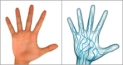
Another technology innovation is the bio metric identification and security device known as Palm Secure.


It works by identifying the vein pattern in the palms of our hands.Similar to our fingerprints, vein patterns are unique to each individual. The purported advantages of this technology is that it is less expensive, easier to manage, and is more reliable than traditional methods of identification.

And the technology is still going on...................

Future Living

“All technology should be assumed guilty until proven innocent.”
“Ours is a world of nuclear giants and ethical infants. If we continue to develop our technology without wisdom or prudence, our servant may prove to be our executioner.”

A Day of Glass Where Technology is Amazing

Look How future Will Be....,

Did you like that..............